Update to Haptap Provisioner portal
The Haptap Provisioner portal is being updated on 28 April 2026 to streamline a number of areas. Note that the screenshots below represent a version of the Haptap brand, and the service names will be different for white label brands.
Faster navigation for partners with
multi-tiered channel structures
In the Partners view, there are now direct links to go to partners or customers under that level
A simpler interface for partners with only one brand
For partners with a single brand, the Partners and Customers tables no longer show brand information, as per the previous screenshot.
For partners with multiple brands, the Brand column still shows but the multi-brand column has been removed
Less clicks to provision a new customer
Adding a new customer and assigning the Call Manager service can be done in a single step.
Support for provisioning new Haptap services
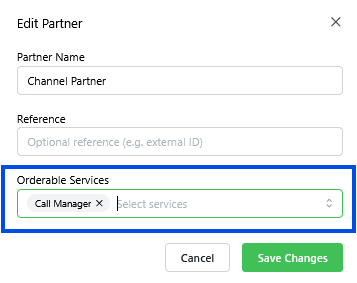
When managing channel partners, instead of selecting "Can Provision" individual services can be delegated to the channel partner for self-provisioning. This allows service providers to keep control over how new Haptap services are made available to channel partners..
Related Articles
User Roles in Provisioner
Provisioner supports five different user roles: Owner, Writer, Provisioner, Supporter and Reader. By default all roles are inherited when accessing a descendant partner. If you have a Portal User with the Owner Role on Partner A, then you also have ...What's new in Provisioner
January 2026 Microsoft GCC High Support The Provisioner platform now has general availability for creating customer service instances on both Commercial and GCC High tenants. Reach out to your account manager if you don't currently have this enabled ...Audit Logs in Provisioner
Overview Each change made in the Provisioner platform is tracked in an Audit Log. This is available from the Provisioner interface using the menu on the left hand side to select 'Audit Log'. The log is shown for the current Partner. To view changes ...Access a Customer's Call Manager as a Partner
Partners can access the Call Manager instances for all their customers, both at their Partner level and for all child Partners. Login to admin.yourbrand.com Partner Management portal. Navigate to the appropriate Partner level Select Customers on the ...Adding and Managing GCC High and Commercial Tenants
Call Manager supports both Microsoft Commercial Cloud and Microsoft GCC High (GCCH). Once configured, Provisioner will be able to create and manage both Commercial and GCCH customer tenants from a single portal. Add Branded GCC High Cloud Support ...